Azure Function (Python) Application Insights
This article explores configuring Application Insights for Python Azure Functions to achieve visual spans for individual function calls, enabling nested tracing for better insights into function behavior.
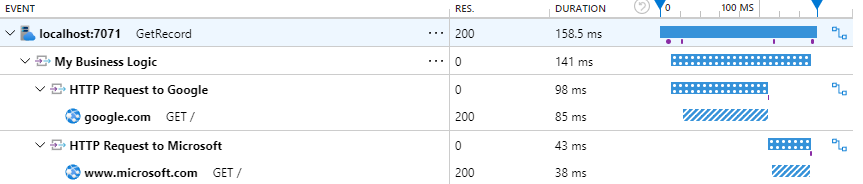
Step 1: Use the Correct pip Package
# requirements.txt

azure-functions==1.24.0
azure-identity==1.25.1
aiohttp==3.13.2
azure-monitor-opentelemetry==1.8.3
requests==2.32.5
cryptography==46.0.3
As documented here: Microsoft Learn | Use OpenTelemetry with Azure Functions | Enable OpenTelemetry in your app
Do not enable OpenTelemetry in the Functions host as documented here: Microsoft Learn | Use OpenTelemetry with Azure Functions | Enable OpenTelemetry in the Functions host, because it will enable OpenTelemetry at a low level and send unnecessary data to Application Insights. See GitHub issue | OpenTelemetry captures and spams with GET /admin/host/ping requests
Step 2: Configure OpenTelemetry in function_app.py
from azure.monitor.opentelemetry import configure_azure_monitor
configure_azure_monitor()
As documented here: Microsoft Learn | Use OpenTelemetry with Azure Functions | Enable OpenTelemetry in your app
Step 3: Transform Function Context into OpenTelemetry Context
import azure.functions as func

from azure.monitor.opentelemetry import configure_azure_monitor
from opentelemetry import trace
from opentelemetry.propagate import extract

# Configure Azure monitor collection telemetry pipeline
configure_azure_monitor()

def main(req: func.HttpRequest, context) -> func.HttpResponse:
   ...
   # Store current TraceContext in dictionary format
   carrier = {
      "traceparent": context.trace_context.Traceparent,
      "tracestate": context.trace_context.Tracestate,
   }

   # Create tracer instance for trace correlations
   tracer = trace.get_tracer(__name__)

   # Start a span using the current context
   with tracer.start_as_current_span(
      "http_trigger_span",
      context=extract(carrier),
   ):
      ...
This approach is documented here: GitHub | Azure | azure-sdk-for-python | azure-monitor-opentelemetry
Example Repository
https://github.com/lAnubisl/AzureFunctionPython
Additional Context and Links
Note that there is no automatic dependency and transaction diagnostic auto-collection. Additionally, there are no samples demonstrating how to track dependencies manually for Python Azure Functions. The Azure Functions Python Developer Reference Guide describes how to log custom telemetry using the OpenCensus library. You can also find samples of how to use this library in Monitor a distributed system by using Application Insights and OpenCensus. However, you should not use it because Azure Monitor support for OpenCensus will end on 30 September 2024 - transition to using Azure Monitor OpenTelemetry Python Distro. Here is the guide for Migrating from OpenCensus Python SDK and Azure Monitor OpenCensus exporter for Python to Azure Monitor OpenTelemetry Python Distro and a step-by-step guide: Enable Azure Monitor OpenTelemetry for .NET, Node.js, Python, and Java applications